Zapier PowerPoint: generate editable .pptx slides and decks from any Zap
Updated 2026-09-13 · ~6 min read · Guide
SlideForge is a Zapier integration that turns the data already moving through your Zap into native, editable PowerPoint — real text boxes, tables and chart shapes in a .pptx, not a picture of a slide. A form submission, a spreadsheet row or a webhook goes in; a finished slide comes back in about a second as a file the next step can email or upload. No model draws the slide, so your numbers arrive exactly as you sent them.
TL;DR
- Connect: add a SlideForge action, paste a key from Console → API Keys. 60 free slides, no card.
- Three actions: a slide from a brief, a slide bound to a named layout, or a whole deck.
- No Code step: map spreadsheet or webhook rows straight onto the Items line items.
- Honest failure: a render that cannot produce a real file fails the step with the fix in the message — never a silent empty attachment.
- $0.05 per completed slide, on every path. Nothing extra to pay Zapier for using it.
Connect your account
Add an action step to any Zap, search SlideForge, and pick one of the three actions. Zapier asks you to sign in: create a key at slideforge.dev/console/keys (it starts with sf_live_) and paste it. The key is checked on the spot and the connection is labelled with your account email, so you can tell two accounts apart later. New accounts start with 60 free slides, no card.
The integration is listed in Zapier's app directory with a Beta badge — that is Zapier's standard 90-day window for a newly approved integration, not a beta of the rendering engine, which is the same one behind every other path into SlideForge.
The three actions
Create Slide From Brief
Describe the slide in plain text, including the actual figures. SlideForge picks the layout and binds your wording and numbers verbatim.
Create Slide From Layout
Bind your own content to a named layout chosen from a live dropdown of the catalog — headline, context, and either line Items or explicit JSON. Deterministic: the same input always renders the same slide.
Create Deck
Up to 30 slides rendered in parallel and merged into one file, with a contact sheet showing every slide.
All three also take a Theme (your own brand kit from Console → Brands, or a built-in), a Language including right-to-left scripts like Arabic and Hebrew, and imagery and styling options.
Spreadsheet rows to a slide, without a Code step
This is the part worth knowing. Zapier's data model is flat fields and line items, not nested JSON — so on most integrations, turning four spreadsheet rows into one slide means a Code by Zapier step to rebuild the structure by hand.
Create Slide From Layout has an Items line-item group instead. Map your trigger's fields onto Label, Value, Delta, Sub and Detail, and SlideForge puts those rows wherever the layout you chose keeps its repeating content — metrics on a KPI board, stages on a funnel, rows on an agenda. A Google Sheets row set, a webhook array, or a looping step all arrive in the same shape.
Four mapped rows and a headline, and this is the render that comes back:
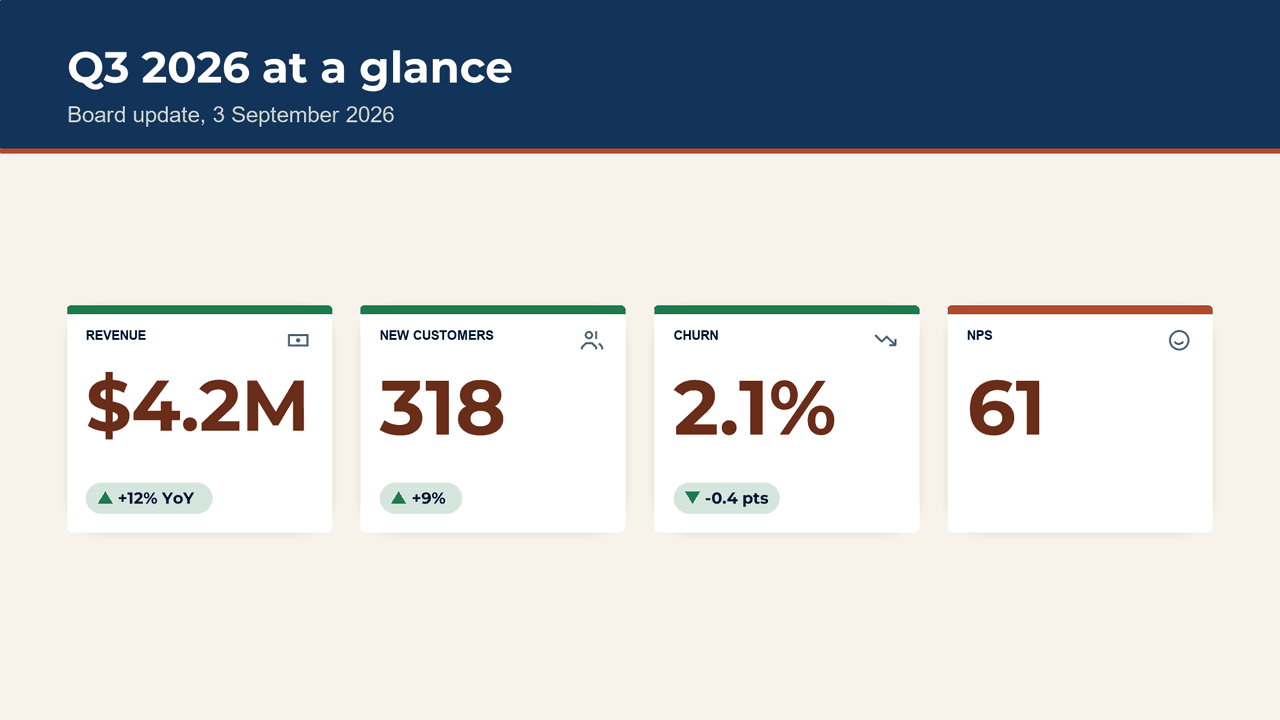
Every figure on that slide is the string that came out of the trigger. Nothing rounded it, reworded it, or re-typed it. If you would rather hand over the whole payload yourself, the Blocks (JSON) and Data (JSON) fields take it directly, and they win over Items when both are set.
What the step hands the next step
- Presentation File (.pptx) — The editable deck, as a file the next step can attach.
- PDF File — The same render as PDF.
- Preview Image (PNG) — A picture of the slide — decks get a Contact Sheet of every slide instead.
- Fidelity — verbatim, mixed or ai_completed — what actually made it onto the slide.
- Warning Codes — Machine-readable notes like ai_completed_figures, for a Filter step.
- Cost (USD) / Billed — What this render cost, and whether it was charged at all.
The files are real file fields, so a Gmail or Slack step can attach the .pptx with no download step in between. They are fetched with your own key when the next step asks for them — no public link is ever minted.
Two of those outputs are worth a Filter step. Fidelity tells you whether everything on the slide came from you (verbatim) or whether the layout needed something you did not supply and it was authored for you (ai_completed, flagged in Warning Codes). Branch on that and the Zap will not mail a deck it cannot vouch for.
When it cannot render, it says so
A render that cannot produce a usable file fails the Zap step, carrying SlideForge's own explanation of what to change. It does not succeed quietly with an empty attachment. In an automation that matters more than it sounds: an errored Zap run is visible in Zap History and emails you; a blank deck in a client's inbox is not visible until someone opens it.
The one place this is softened on purpose is Create Slide From Brief. A Zap has no one to ask when a layout needs a figure the brief never mentioned, so Author Missing Figures is on by default: the missing part is authored, and disclosed in Fidelity and Warning Codes rather than hidden. Turn it off and such a brief is refused instead, with the fix in the message.
What it does not do yet
- No trigger. Nothing in SlideForge is a natural polling source. SlideForge is what a Zap does at the end, not what starts it.
- No PDF or image conversion in Zapier yet. Turning a PDF page or a screenshot into editable slides needs a file upload; it works over the REST API and MCP today, and lands here when someone asks for it.
- No Zap templates yet. They need a published app, which we now are — so they are next.
If one of those is what you need, say so — the order this gets built in follows what people actually ask for.
Zapier, MCP, or the REST API
Same engine, same $0.05 per slide, three ways in. The Zapier integration is the one to use when the data already lives in a Zap. If you want an AI agent to choose the layout, point it at the MCP server. If you are writing code, the REST API is the same contract with more plumbing. And if your automation platform is n8n rather than Zapier, there is a community node for that.
Frequently asked questions
Can Zapier generate PowerPoint files?
Yes. Connect the SlideForge integration and any Zap can render native, editable .pptx — real text boxes, tables and chart shapes, not a screenshot wrapped in a slide. The file comes back on the step as a file field, so the next step can email it, upload it to Drive, or post it to Slack with no conversion in between.
How do I connect SlideForge to Zapier?
Add a SlideForge step to any Zap and choose Sign in. Paste an API key from slideforge.dev/console/keys — it starts with sf_live_. Zapier checks the key immediately and labels the connection with your account email. New accounts include 60 free slides with no card.
Can Zapier turn Google Sheets rows into a slide?
Yes, and without a Code step. Create Slide From Layout has an Items line-item group: map the Sheets row fields onto Label, Value, Delta, Sub and Detail, and SlideForge places those rows where the layout you chose keeps its repeating content — metrics on a KPI board, stages on a funnel, agenda rows on a list. Line items from a webhook array work the same way.
Does it use AI to draw the slide?
No. Nothing in the render path passes through a language model, so a figure cannot drift on its way to the slide. The same input renders the same slide, which is what makes a weekly report reproducible. Create Slide From Brief does use a model to read your brief and choose a layout — but the figures you wrote are still bound verbatim, and the response tells you field by field.
What happens if the slide cannot be rendered?
The Zap step fails with SlideForge's own message explaining what to change — it never succeeds with an empty or placeholder file. That is deliberate: a silent empty attachment is worse than a visible error, because nobody notices until the deck is already in someone's inbox. A render that is not complete is also never billed.
What does Fidelity mean in the output?
Every render reports fidelity per field. verbatim means every value you supplied appears on the slide exactly as supplied. mixed or ai_completed means the layout needed something your input did not provide and it was authored for you — flagged in Warning Codes as ai_completed_figures. Add a Filter step on Fidelity and your Zap will only send decks it can vouch for.
What does it cost to generate slides through Zapier?
$0.05 per completed slide, the same on every path — Zapier, MCP, or the REST API. No subscription, no per-seat fee. A render that is not complete costs nothing, and an identical repeat render is free. New accounts start with 60 free slides. Publishing and using the integration costs nothing on Zapier's side; your own Zapier plan is separate and up to you.
Is there a SlideForge trigger?
No, deliberately. Nothing in SlideForge is a natural polling source, so a trigger would exist only to fill out the listing. SlideForge is what a Zap does at the end — after the form, the schedule or the spreadsheet row that started it.
Can I use my own template or brand colours?
Yes. Upload a .pptx template or design tokens once at slideforge.dev/console/brands and your brand kit appears in the Theme dropdown on all three actions. Pick it and the deck renders in your fonts and colours instead of the default theme.
Put a real deck at the end of your Zap
Add the action, paste a key, and the next run sends an editable .pptx. 60 free slides, no card.