n8n PowerPoint: generate editable .pptx slides and decks from any workflow
Updated 2026-09-03 · ~6 min read · Guide
SlideForge is a verified n8n community node that turns workflow data into native, editable PowerPoint — real text boxes, tables and chart shapes in a .pptx, not a picture of a slide. Rows from Sheets, Postgres or an API go in; a finished deck comes back in about a second as binary data on the item, ready for the next node to email or upload. No AI Agent required, and no model anywhere in the render path.
TL;DR
- Install: Settings → Community nodes → Install →
n8n-nodes-slideforge. On n8n Cloud it is in the nodes panel — see the SlideForge page in n8n's integrations directory. - Key: Console → API Keys, paste into a SlideForge API credential. 60 free slides, no card.
- Deterministic: the same input renders the same slide — a report pipeline you can diff, not a fresh guess each run.
- Verifiable: every render returns a per-field fidelity report; a defective slide is never billed.
- Three ways in: this node, n8n's MCP Client node, or the REST API from an HTTP Request node. Same engine, same $0.05 per slide.
Install the node
On self-hosted n8n: Settings → Community nodes → Install, enter the npm package name, accept the community-node prompt:
n8n-nodes-slideforgeSearch SlideForge in the node panel and it is there:
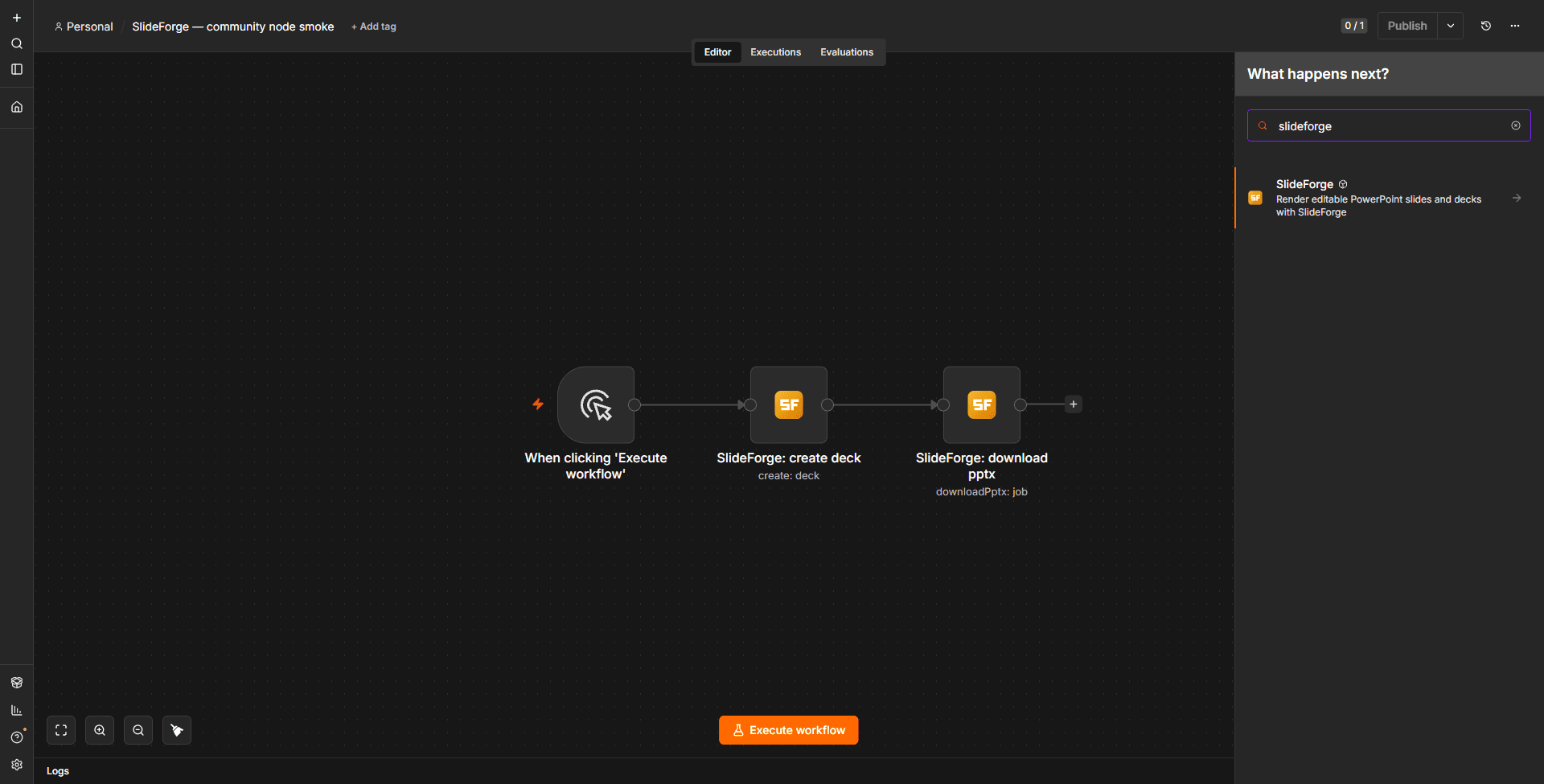
Then add the credential: slideforge.dev/console/keys → create a key (it starts with sf_live_) → in n8n, new credential of type SlideForge API → paste. New accounts start with 60 free slides, no card.
What the node can do
Slide
- Create From Brief — Describe the slide in plain text; SlideForge picks the layout.
- Create From Layout — Bind your own content to a named layout for a repeatable render.
Deck
- Create — Up to 30 slides rendered in parallel, merged into one .pptx.
- Outline — Preview the slide plan and the price before rendering. Free.
Job
- Get — Status, fidelity report and warnings for one render.
- Get Many — List recent renders.
- Download PowerPoint — Attach the .pptx to the item as binary data.
- Download Preview — Attach the PNG preview to the item as binary data.
Catalog
- Get Many Layouts — Every layout, what it is for, which fields it binds. Free.
- Get Layout Schema — Fields, capacity and examples for one layout. Free.
The create paths also take theme, language, writing direction (including right-to-left for Arabic and Hebrew), styling, imagery and a minimum font size — set once on the deck and inherited by every slide.
Sheet to deck in three nodes
The shape almost every reporting workflow takes: Google Sheets → Code (map rows to slides) → SlideForge: Deck → Create → SlideForge: Job → Download PowerPoint → Gmail. The Code node builds a slides array:
const rows = $input.all().map(i => i.json);

return [{ json: { slides: [
  {
    form: 'hero_statement',
    headline: 'Weekly metrics report',
    context: 'Generated from the metrics sheet by n8n',
  },
  {
    form: 'kpi_metrics',
    headline: 'Where the business stands',
    source_note: 'Source: metrics sheet',
    data: {
      metrics: rows.slice(0, 5).map(r => ({
        label: r.Metric, value: r.Value, sub: r.Change,
      })),
    },
  },
] } }];
Paste that array into the node's Slides field (or wire it with an expression) and pick your options:
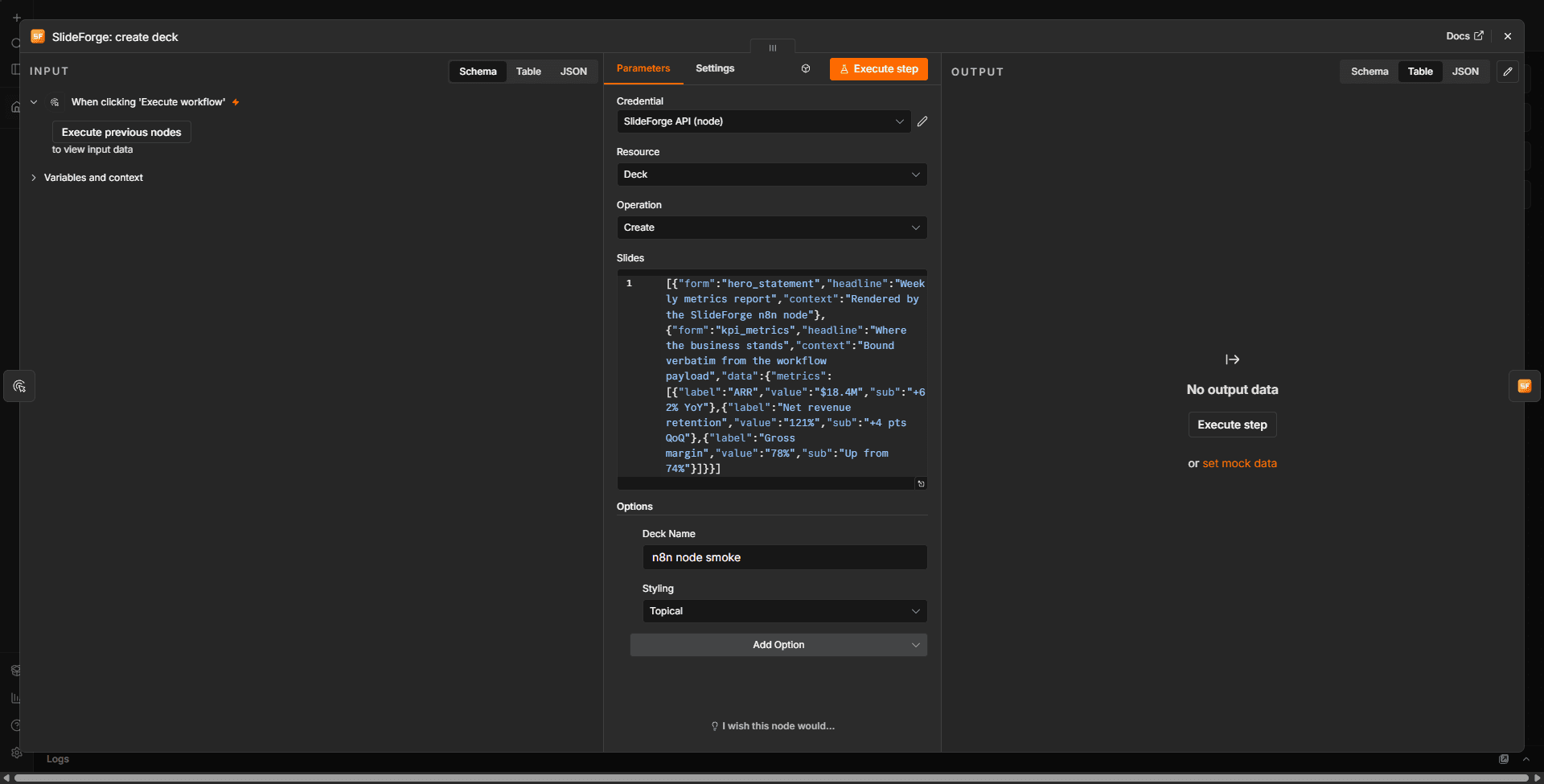
Not sure which layout to use? Add a Catalog → Get Many Layouts step once and read the menu, or use Slide → Create From Brief and let SlideForge route it. The layout list in Create From Layout loads live from your account, so it is never out of date.
The second node takes the job_id and hands the workflow the actual file — named, typed, and ready to attach:
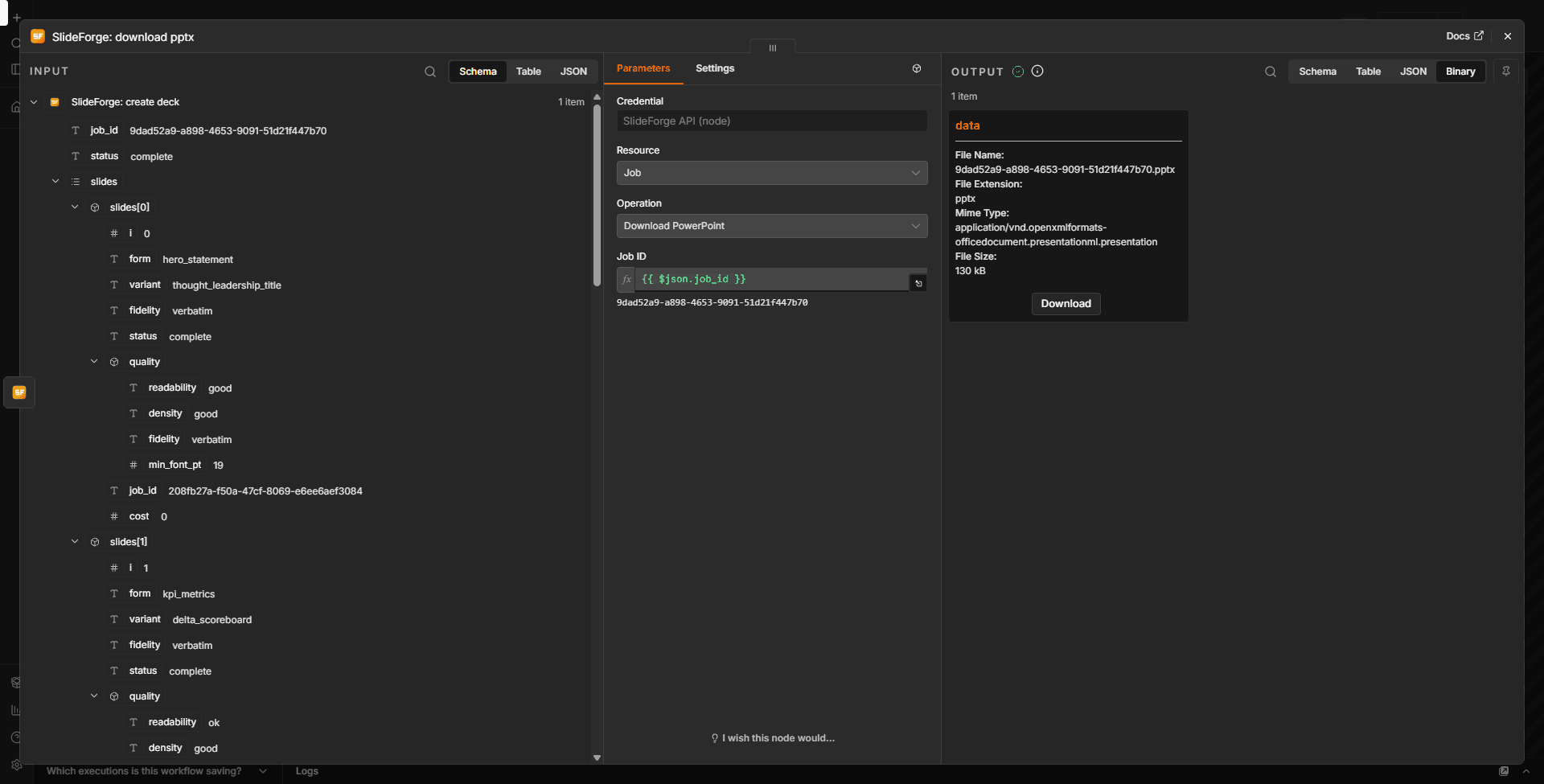
Note the left-hand pane: every slide reports its form, status and fidelity. verbatim means every value you supplied is on the slide exactly as supplied. Branch on that in an IF node and your pipeline will not email a deck it cannot vouch for.
Node, MCP, or REST API
Three ways to reach the same engine from n8n, at the same price:
- The community node — typed fields, credential handling and the file as binary data. Best for deterministic reporting.
- The MCP Client node — point it at
https://api.slideforge.dev/mcp/and an AI Agent can browse the catalog and build the deck itself. Works as a standalone step too, no agent needed. - The REST API — an HTTP Request node against
/v1/render/intent/deckwith a bearer key. Same contract, more plumbing. See the API docs.
PDF and image conversion to editable slides, and translation into 35 languages, ride the same account through the API and MCP surfaces.
Why a workflow wants a deterministic renderer
You can ask a language model to write python-pptx code inside n8n and it will produce a file. For a one-off that is fine. For something that runs every Monday it is the wrong shape:
- Numbers: in a generated-code path your figures travel through the model on the way to the slide. Here they are bound verbatim, and the response says so field by field.
- Time: generated code takes minutes per deck; a typed intent renders in under a second, and deck slides render in parallel.
- Stability: the same input renders the same slide, so last week's deck and this week's differ only where the data differs.
- Failure: a slide that does not fit comes back as a warning, not as silently clipped text nobody notices until the meeting.
The honest converse: if you need a bespoke layout no catalog covers, generated code is the right escape hatch — and SlideForge exposes that too, as a sandboxed python-pptx mode.
Frequently asked questions
Can n8n generate PowerPoint files?
Yes. Install the SlideForge community node (npm package n8n-nodes-slideforge) and any workflow can render native, editable .pptx — real text boxes, tables and chart shapes, not a screenshot wrapped in a slide. The file arrives on the item as binary data, so the next node can email it, push it to Drive, or post it to Slack without a conversion step.
How do I install the SlideForge node in n8n?
Self-hosted: Settings → Community nodes → Install, then enter n8n-nodes-slideforge. n8n downloads it from npm and the node appears in the node panel straight away. On n8n Cloud, verified community nodes install from the nodes panel itself. Then add a SlideForge API credential with a key from slideforge.dev/console/keys.
Where do I get an n8n SlideForge API key?
Sign up at slideforge.dev and open Console → API Keys (slideforge.dev/console/keys). The key starts with sf_live_. New accounts include 60 free slides with no card. In n8n, create a credential of type SlideForge API and paste the key — the node sends it as a bearer token.
Does it work without an AI Agent node?
Yes, and that is the point. The node is a plain Main-to-Main node: rows in, .pptx out, no model anywhere in the path. A given input always renders the same slide, which is what makes a weekly report reproducible. You can also drive SlideForge from an AI Agent over the MCP Client node when you want the agent to choose the layout.
Can n8n turn Google Sheets rows into a PowerPoint deck?
That is the most common shape. Google Sheets → Code (map rows into a slides array) → SlideForge (Deck: Create) → SlideForge (Job: Download PowerPoint) → Gmail. Your figures are bound verbatim from the sheet: the render path never passes them through a language model, so a number cannot drift.
How do I know the generated slide is actually correct?
Every render returns a status and a per-field fidelity report. fidelity: verbatim means every value you supplied appears on the slide exactly as supplied. A slide with a blocking defect comes back not complete — and is never billed. Branch on status in n8n and you have a report pipeline that refuses to send a broken deck.
What does it cost to generate slides in n8n?
$0.05 per completed slide, on every path — node, MCP, or REST API. No subscription required and no per-seat fee. A render that is not complete costs nothing, and re-requesting an identical input is free. New accounts start with 60 free slides.
Is there an n8n alternative to the Google Slides node and templates?
Yes — this is it, for PowerPoint. Nearly every n8n slide template is built on Google Slides, which means a Google account, a template deck to maintain by hand, and placeholder-replacement that breaks when the template drifts. The SlideForge node generates native .pptx from typed data with no template file to maintain: the layout comes from a catalog of 200+ forms, and the deck downloads as a file your workflow can attach anywhere — no Google account involved.
Can I use SlideForge in n8n without the community node?
Yes, two other ways. n8n's MCP Client node points at https://api.slideforge.dev/mcp/ and exposes the same tools to an AI Agent or as a standalone step. Or call the REST API from the HTTP Request node — POST /v1/render/intent/deck with a bearer key. The community node exists because it removes the JSON plumbing and hands you the file as binary.
Add PowerPoint to your n8n workflows
Install n8n-nodes-slideforge, paste a key, and the next run emails a real deck. 60 free slides, no card.